

Frequently Asked Questions
Infinity OnCall
How do I assign a schedule into subaccounts using the same Directory of resources?
I have one schedule that is currently on one account, but I need to extend that to new subaccounts that I am creating for this main account. The main account is 7417146 and the subs are 37417146 and 47417146 and the Directory of Resources subject name is 7146. How can I assign a schedule to each of these using the same Directory of Resources?
If you want to share the OnCall so that all three of the accounts see the same schedule, you simply assign that same schedule to all three accounts in the OnCall Clients portion of OnCall Scheduler. However if you want each account to have a separate schedule but want to use the same Directory you have two additional options.
Option #1: You would use the subschedule option in the OnCall Scheduler
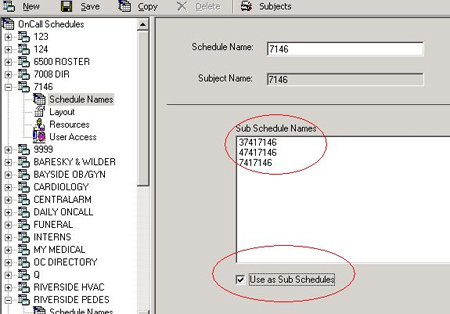
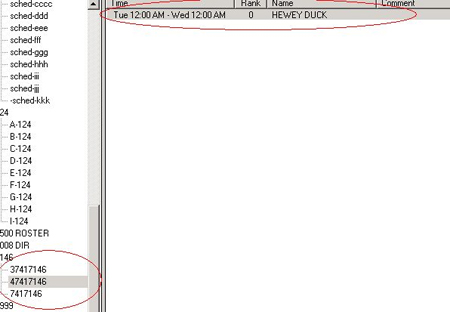
When you schedule your resources, you only assign to the sub schedules. I prefer not to schedule anything in the main schedule:
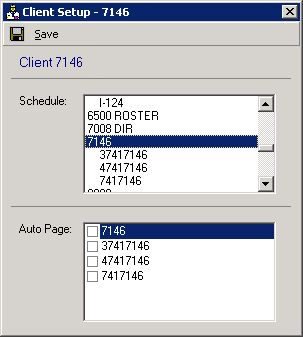
You assign the main schedule to each of the accounts under the client as you normally would.
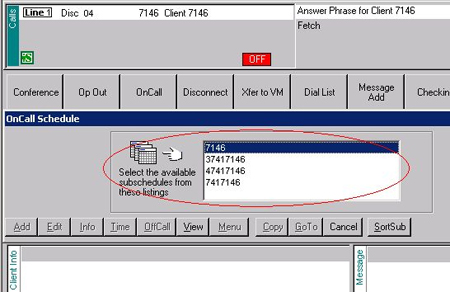
When you assign this type of sub schedule to each of the accounts, it looks like this to an operator. The operator simply uses her up and down arrows to choose the correct schedule and presses ENTER to open it. To return to this box, she presses M for Menu.
Option #2: This option allows you to use the same setup steps that are above with the exception of the sub schedule screen in OnCall. DO NOT check the “use these as Sub Schedules” checkbox, but program everything the same.
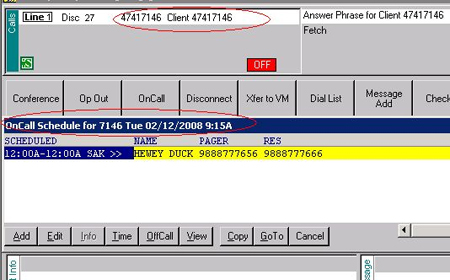
When you use the Client menu option in OnCall, assign each of the sub schedules to each of the accounts instead of assigning the main schedule to each of the accounts:
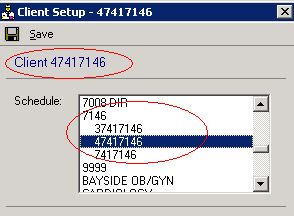
Now the operator will only see the schedule that you have programmed for each account instead of seeing all of the schedules on each account:
What is the proper procedure for deleting OnCall Schedules?
First, How NOT to delete:
Delete a resource without first deleting the schedule for a person. The ID number for the deleted resources will recycle to the resource for a brand new client. As a result, this client shows in the OnCall schedule for the account where the resource was deleted.The proper way to delete a resource from an OnCall Directory:
1. Delete every schedule for the resource, including past schedules
2. Delete the resource
3. If you need to keep the past OnCall schedules, delete future schedules and rename the resource to something like “DELETED/TOM SMITH” and then delete after old schedules have purged.Deleting an OnCall Schedule Directory:
1. Delete every schedule associated with the OnCall
2. Go to OnCall Supervisor, go to Clients and select “no schedule”
3. Go to Infinity Supervisor – Client – Directory and select Directory Subject “None”Go back to OnCall Supervisor – Schedule Setup and select the schedule. Choose delete. It will ask if you want to remove it from Infinity Directories as well as OnCall Schedule.
What is the default login?
Username: system and Password: PASSWORD
Does the IS server software have to be right on the SQL server?
No. We can load it on any other 2000 or 2003 server.
Do I need a separate SQL server just for IS?
Usually not. We can use an existing SQL server.
What do I do if CLIENTS is grayed out?
Depending on your version, set &OLDONCALL or have the PERMISSIONS SET. There is a patch for later versions that will do it globally.
What if a schedule is having issues or I cannot add a resource?
REBUILD-ONCALL
How do I give an Operator rights to all schedules?
+OP-RIGHTS