Frequently Asked Questions
Billing Link
Help! My emails are sending but not being received.
1. If it looks like emails are sending but are not reaching their destination, change the Advanced Setting-Mail Threads to “1”.
2. Failures remain in Held Emails when printing. Make sure to use the Held Email function and have them check their mail server for the failure reason. In BL4, mail is successfully sent to the mail server however it failed between there and its destination.
3. Check the Email Log file located in the Template folder. Look at System-File Locations-Word Report Templates (yellow link) to see where the templates are saved. If that is blank, it defaults to the Template location (usually c:Amtelcobillingbl4wordreporttemplates).
How do I remove a posted payment from a client's history?
1. Locate (or create) a “dummy” account to move the payment to.
2. Do the math and figure out what the balance should be after removing the payment.
3. Double-click the offending payment in the client history.
4. Click OK on the Transaction Code notification.
5. The second box that comes up is to enter the Billing ID to move the payment to (your “dummy” account).
6. Go to Client Maintenance-Payment Methods and Change Client Balance to the correct amount.
Where do I find the Report and Invoice file locations?
It is located in System-File locations. For the report Layouts, go to System-File Locations-Word Report Templates:

How do I get Subaccount names to show up on the Master Invoice (Transfer Master)?
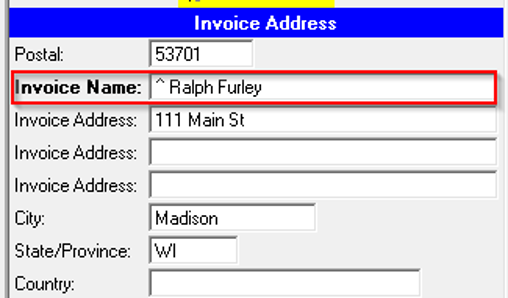
On each of the Transfer Subaccounts go to Client Maintenance-Basic Info. Whatever is entered in the Invoice Name field will be how this subaccount is listed on the Master Account’s Invoice.
Note: For the Subaccounts to display the same in the Master Account’s history, go to Help-Advanced Settings and set the Display Sub Detail in Master History to “1”. The ^ will display the total billable stat for the Subaccount’s Invoice.
How do I add a Subaccount Summary Report to an Invoice?
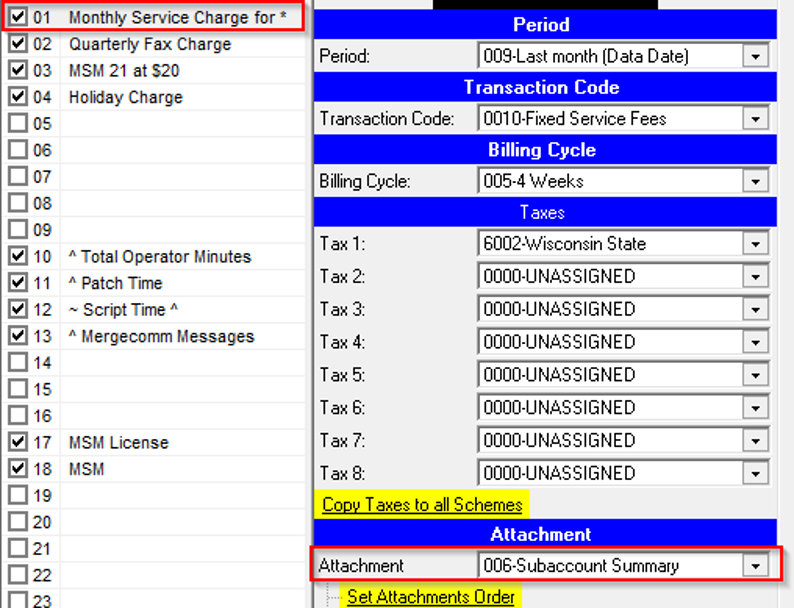
1. On the Master Account, go to Client Charges-Miscellaneous Settings on an active Scheme.
2. Select 006- Subaccount Summary from the Attachement drop-down. Subaccounts have to have the ^ in the Scheme descriptions or the Subaccount Summary on the Master Account will have zeros.
3. If you are using the legacy method (non-Word layout), the Subaccount Summary will need to be added to the bottom of the Invoice Layout in System.
Help! Reports in Word are printing the same report no matter which report is selected.
1. Look at System-File Locations-Word Report Templates (yellow link) to see where the Templates are saved. If that is blank, it defaults to the Template location (usually c:Amtelcobillingbl4wordreporttemplates).
2. Open the files report.doc and reportlandscape.doc (or .docx) and be sure they are both blank and both have the proper orientation. If something is saved there, highlight everything and delete then save.
My Credit Card Export is not showing all charges.
Verify they have archived first, then run the CC Export Report. It will only export archived charges.
How do I locate unarchived Invoices?
1. Run the Report-Financial-Unarchived Invoices
or
2. Open the System Log file: Menu-System Log and filter for Invoices-Refresh.3. Look for Event-Invoice(s) not archived.
4. Right-click to see the list of Invoices not archived and the reason.
What is Transaction Code 0000 Unassigned?
There are Schemes that do not have a Transaction Code assigned. In System-Utilities there is a report, Scheme with Transaction Code 0000 that will list the Accounts and Schemes that need to have a Transaction Code assigned.
Why is there not an Invoice Number showing on Preview?
The Invoice Number will not show on the Invoice until it is printed from the Billing section.
How do I change or copy an Invoice Layout?
1. Make a copy of the current layout:
Go to System file locations to find the location of the Template/Images file. Open the Template folder with ‘My Computer’.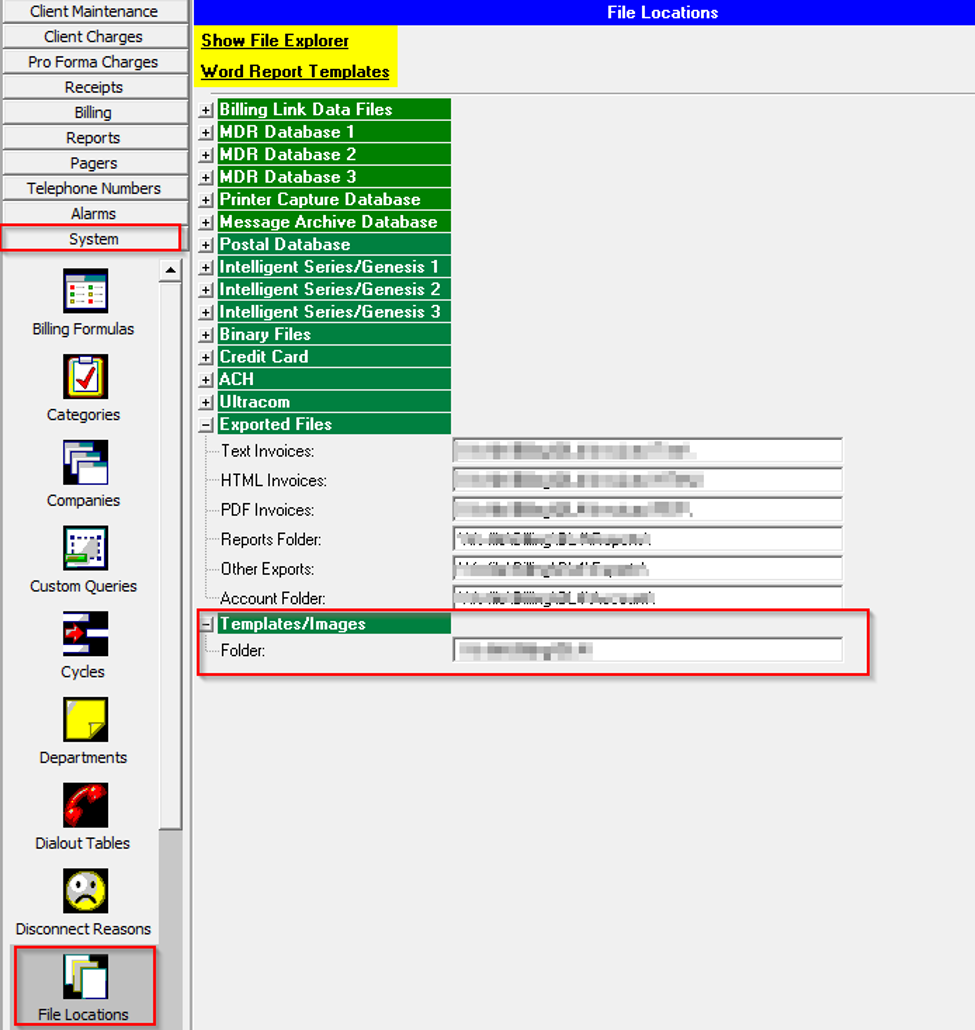
2. Locate the file “#.docx” or “layout#.tx” (the # is the layout number you want to copy).
3. Right-click and do a copy/paste.
4. Rename the copy to be #.docx or layout#.tx (you can use any number that is not currently in use).
5. In BillingLink, go to System/Invoice Layout and select the new layout to make your changes.
Help! Information is missing in my report.
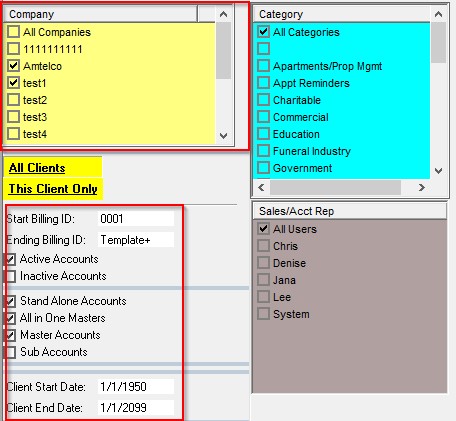
1. Verify that the correct Company or Companies are selected, the client range is including the range you would like.
2. Select Active and/or Inactive Clients. Client Start Date is the actual start date of clients in Client Maintenance – Dates. To include all clients, use 1/1/1950. Client End Date is teh actual disconnect date of clients. To include all clients, use 1/1/2099.If running the Audit Report, the Start and End date should be the actual Invoice Date.
How do I delete an Invoice?
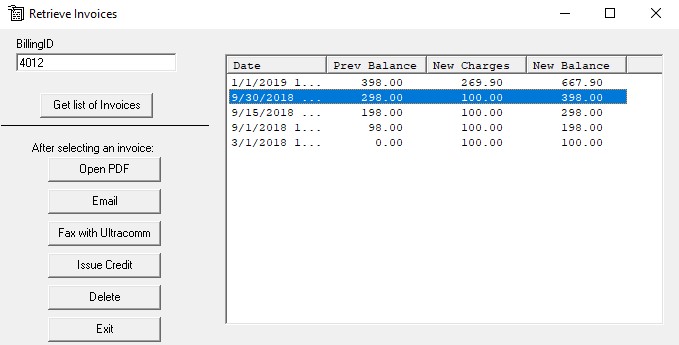
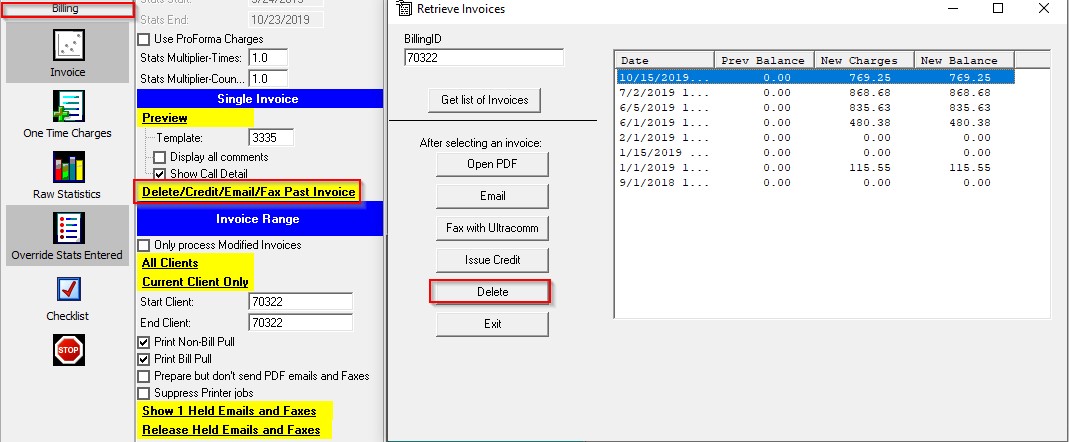
1. Select Billing – Delete/Credit/Email/Fax Past Invoice. Highlight the invoice (should be the last invoice archived) and click delete:
How do I clear held emails?
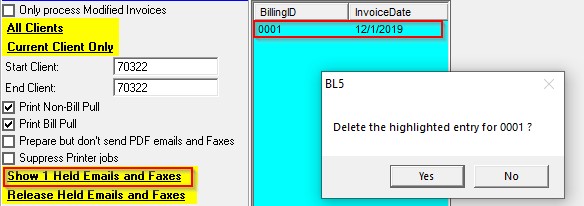
1. To clear one email, click on Show Held Emails, highlight the BillingID and Shift+Right click:
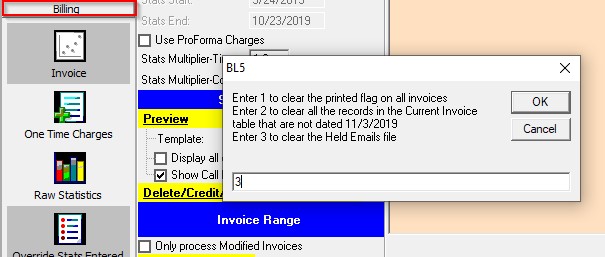
2. To clear all emails, double-click on the Billing section and select option #3 and OK:
Help! No stats are showing on the Invoice.
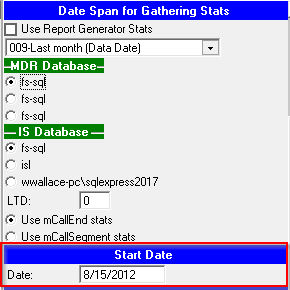
1. Check Start Date in Client Maintenance-Dates. Verify it is set to the client start date:
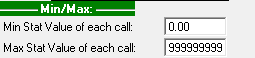
2. In Client Charges-Adjustments & Flags check that the Max Stat Value on each call is set to 999999999:
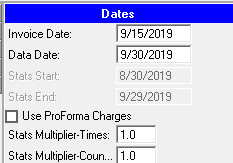
3. In Billing check the Stat Multiplier Time and Stat Multiplier Count are set to 1:
How do I deactivate a Client?
In Client Maintenance-Dates, select the disconnect Reason (setup in System-Disconnect Reasons), select Prorate option and any other of the options. Click on Deactivate all billing schemes. This will deactivate the client and all schemes for the client.
Note: Set Variable charges to expire in 2 months is used with Deactivate only schemes with non-variable charges. This will allow the usage schemes to continue to bill for 2 months but make the flat rate schemes inactive.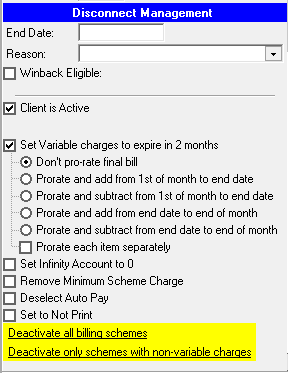
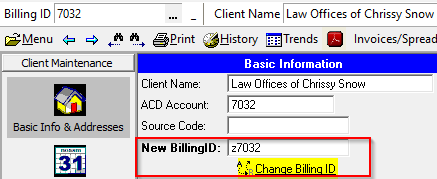
How do I change a BillingID?
In Client Maintenance-Basic Info & Addresses, enter new BillingID number in New BillingID and click Change BillingID:
How do I do a Credit?
Go to Receipts
1. Select Client
2. Select Credit from Payment Type
3. Enter amount as a positive number to subtract dollar amount to balance
4. Select Date
5. Save
6. Post ReceiptHow do I resend an Invoice to a customer if I have already archived?
In the Billing section, on the Invoice page, click on the “Delete/Credit/Email/Fax Past Invoice” link. This brings up a list of prior invoices for the current client.
Highlight the desired invoice from the list on the right, and then choose one of the action buttons from the left.
Note: Check for payments prior to deleting any invoice.